Out-of-the-Box vs. Self-Hosted
Iristick.Teams can be deployed in two ways: a fast cloud-based setup hosted by Iristick, or a secure self-hosted setup within your own Microsoft Azure environment.
Why an Azure Communication Services resource is involved at all
Iristick.Teams is a third-party app, so it must use Microsoft's Azure Communication Services to join Teams meetings — the official Teams client uses internal Microsoft endpoints not available to third parties. The ACS resource is a key issuer, not a data pipe. It mints short-lived tokens and provides a routing endpoint. Call audio and video flow peer-to-peer through Microsoft-operated relays, never through the ACS resource owner's infrastructure. The single architectural difference between OOTB and self-hosted is who owns that ACS resource and the token-broker backend: Iristick (OOTB) or you (self-hosted). Full detail: Why an ACS resource is required.
Out-of-the-Box (OOTB)
The fastest way to get started with Iristick.Teams.
Key Benefits
- Hosted and maintained by Iristick
- Minimal Azure configuration required (IT Admin Setup Guide)
- Ready-to-use after one-time admin setup: install the app, activate glasses, and sign in
- Always running the latest version via Google Play updates
Requirements
- Microsoft 365 Business account with Teams access
- One-time Azure admin setup (IT Admin Setup Guide)
- Iristick.Teams app installed on an Android smartphone
- Activated Iristick smart glasses (licensed with 1LMST)
Best For
- Quick rollouts
- Small or medium-sized teams
- Organizations without strict IT policies
Connection Flow
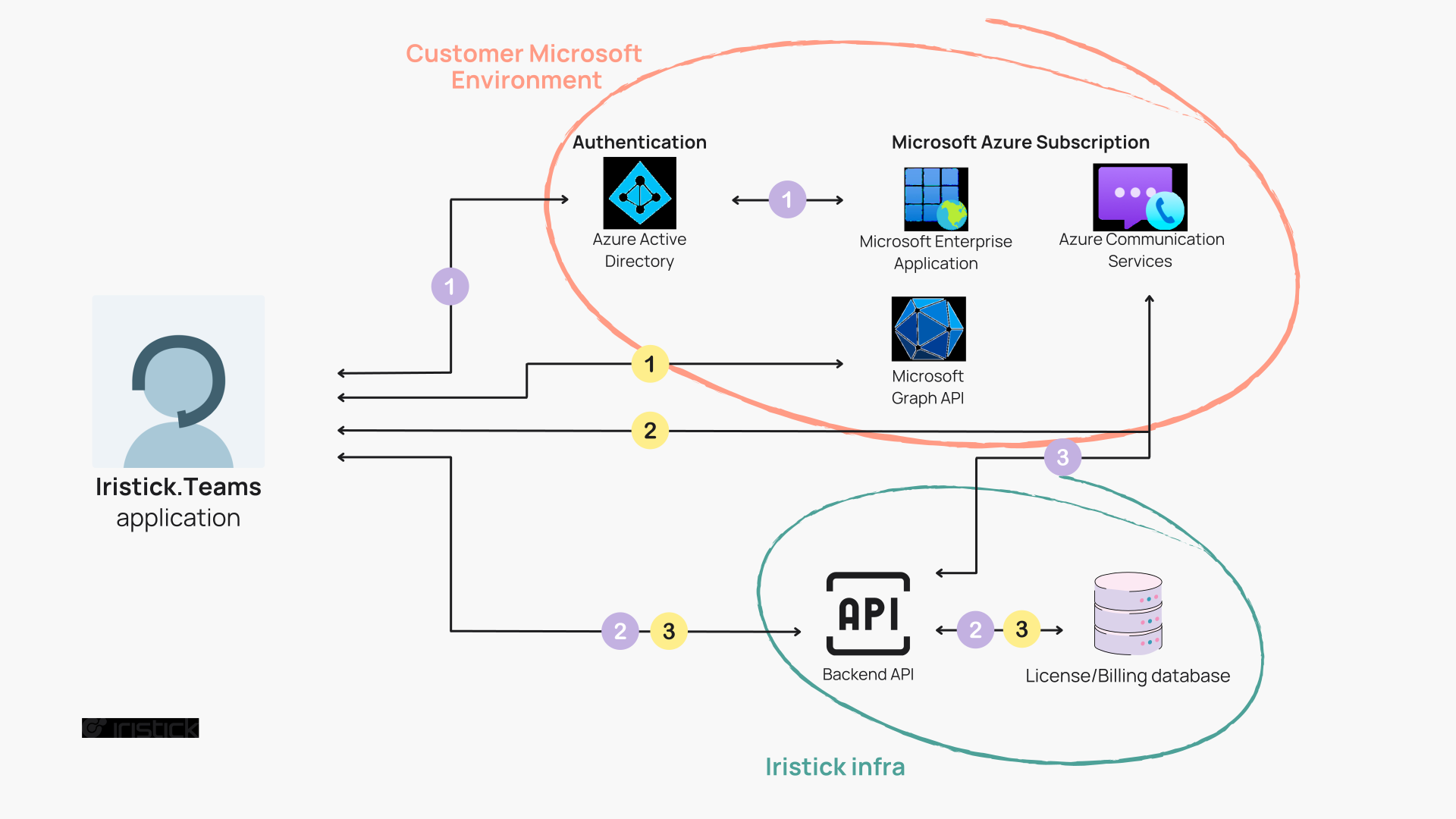
Purple numbered steps = sign in flow · Yellow numbered steps = app usage flow
Two flows run over this infrastructure:
- Authentication — The user signs in using MSAL, which redirects to Azure Active Directory using the App registration provided by Iristick.
- License check — The token received from sign-in is sent to the Iristick backend API together with the serial number of the hardware. The API verifies whether the headset is licensed.
- ACS token exchange — If the license check passes, the Iristick backend uses the ACS resource in Iristick's Azure subscription to generate a short-lived ACS token, enabling the user to make and receive calls via Iristick.Teams.
- Contacts & meetings — The app communicates with the Microsoft Graph API to retrieve contacts and meeting information for display in the app. This data is not stored in the Iristick database.
- Calls — When the user initiates a call, the app contacts the ACS resource directly to facilitate the call (audio and video injection). No audio or video passes through Iristick infrastructure.
- Call summary — After the call ends, the app sends a call summary to the Iristick backend API for billing purposes.
Self-Hosted
Designed for companies with strict data policies or IT-managed infrastructure.
Key Benefits
- Complete control over infrastructure and permissions
- ACS, token broker, and metadata backend all run in your Azure subscription instead of Iristick's
- No user information or call summaries stored on Iristick infrastructure
- App deployed and configured via your MDM (Mobile Device Management) system, on the smartphone only
Call media is the same in both deployments
Call audio and video always flow directly between the device and Microsoft's Azure Communication Services — never through Iristick servers, in either OOTB or self-hosted. The self-hosted choice is about removing Iristick-controlled infrastructure from the path, not about protecting call content.
What You Need
- Microsoft Azure subscription
- Azure tenant ID and Communication Services resource
- App registration within your Azure Active Directory
- MDM system to distribute the Iristick.Teams app and push its managed configuration
- Installation license (1SHIMST) and maintenance license (4SHIMSTMU)
The MDM is required for configuration, not just distribution
Self-hosted uses the public Iristick.Teams apps (Android and iOS) from the app stores — the same apps as OOTB, with no separate build. The app becomes self-hosted through a managed configuration delivered by your MDM, which supplies the parameters that point the app at your own Azure environment. Without this managed configuration the app cannot sign in or place calls.
The MDM manages the smartphone, never the glasses
Everything on this page about MDM applies to the smartphone. The smart glasses are a cabled accessory with no operating system, no user account and no network connection of their own, so there is nothing to enroll and no policy to push to them. This holds for both deployments. In OOTB an MDM is entirely optional and only makes a fleet of phones easier to run. In self-hosted it becomes mandatory because it is what delivers the managed configuration to the app on the phone. Full detail: Device Management and MDM.
What We Provide
- Azure integration package and the managed configuration to apply through your MDM
- Step-by-step installation guide
- 8 hours of setup support
- Ongoing updates through the maintenance license
Best For
- Enterprise environments
- IT departments requiring full control over authentication and data
- Regulated industries or sensitive use cases
Connection Flow
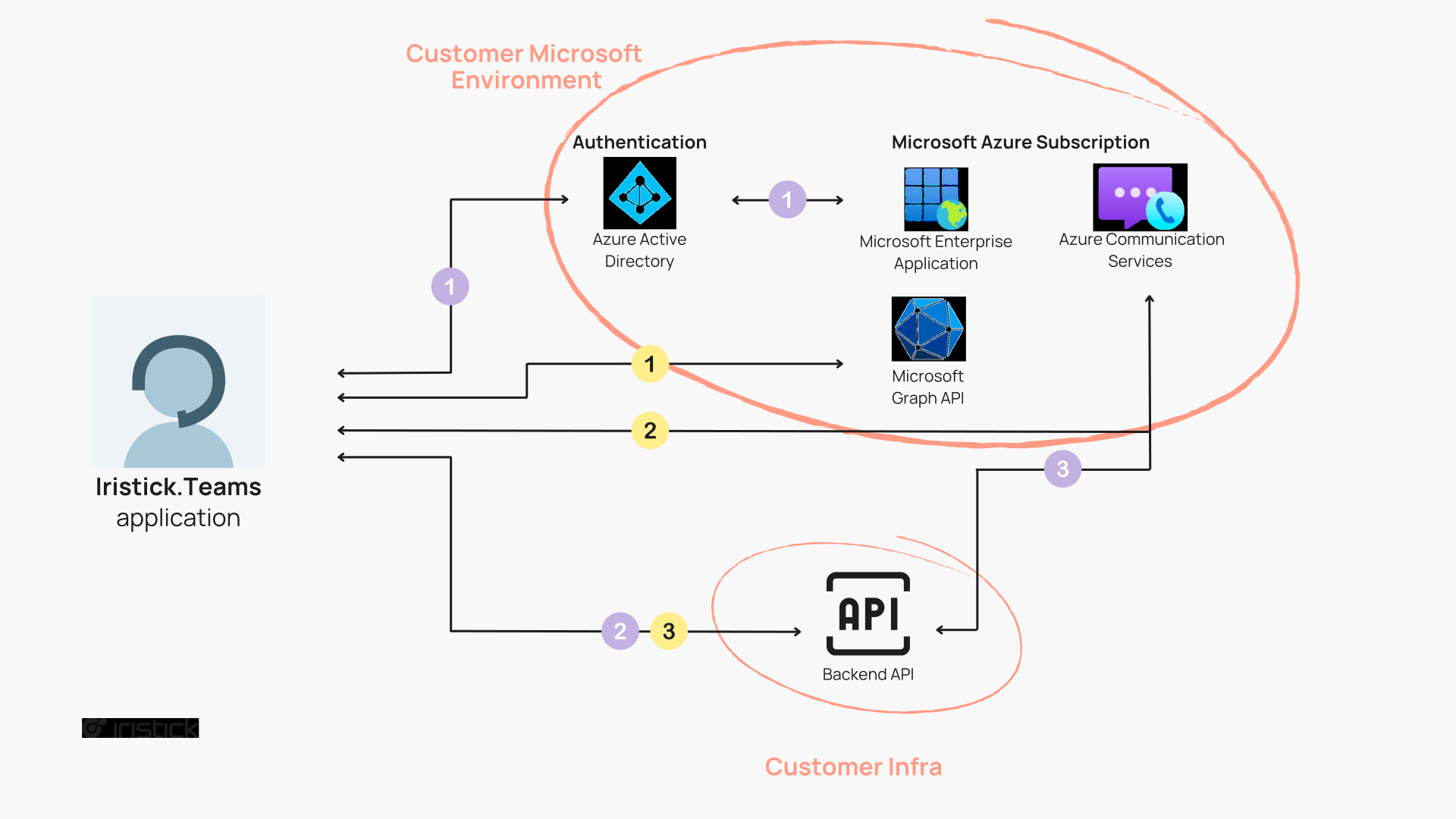
Purple numbered steps = sign in flow · Yellow numbered steps = app usage flow
Two flows run over this infrastructure:
- Authentication — The user signs in using MSAL, which redirects to Azure Active Directory using the App registration provided by the customer (not Iristick).
- License check skipped — The Iristick backend check from the OOTB flow does not exist here. The customer's own backend handles token management directly.
- ACS token exchange — The customer's backend API communicates with the ACS resource in the customer's Microsoft environment to generate a short-lived ACS token, enabling calls.
- Contacts & meetings — The app communicates with Microsoft Graph API to retrieve contacts and meeting information for display. This data is not stored in any database.
- Calls — When the user initiates a call, the app contacts the customer's ACS resource to facilitate the call (audio and video injection). No audio or video passes through customer infrastructure — call media flows through Microsoft ACS.
Not Sure Which One Fits?
| Feature | Out-of-the-Box | Self-Hosted |
|---|---|---|
| Setup time | Instant | Requires IT configuration |
| Hosting | Managed by Iristick | Managed by your IT team |
| App source | Public Play Store / App Store | Same public apps + managed configuration via MDM |
| Updates | Automatic via Play Store | App via store/MDM · backend via license |
| Metadata location | Iristick backend | Your Azure tenant |
| ACS resource | Iristick subscription | Your subscription |
| Call media (audio/video) | Microsoft ACS — not Iristick | Microsoft ACS — not Iristick |
| Custom Azure setup | Not needed | Required |
| Best for | Fast onboarding | Controlled, secure rollout |
Still unsure? Reach out to us and we’ll help you pick the best option for your use case.